
Cursor's Visual Editor: You Do the Work, Then Pay for It

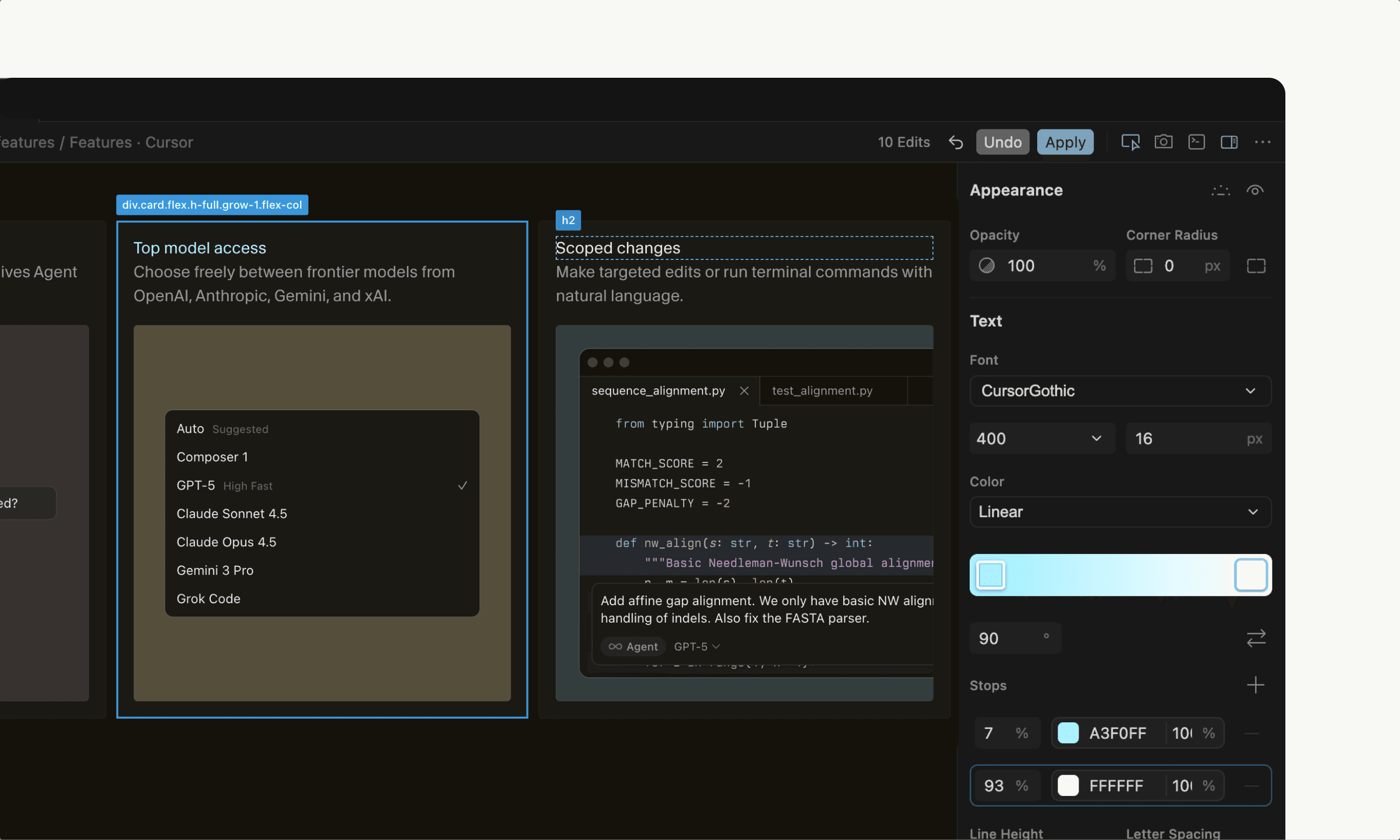
Cursor dropped a visual editor on December 11th. People lost their minds. Reddit threads filled with "diabolically amazing" and "game changer". Then the other half showed up. They weren't impressed.
The visual editor lives inside Cursor Browser. You open your React app. Click an element. Drag it around. Adjust padding with sliders. Change colors in a panel. Feels like Dreamweaver had a baby with VS Code. The promise is simple. Stop writing prompts about moving a button three pixels left. Just move it.
But here's where it gets weird. You make the change yourself. Then Cursor charges you tokens to apply it.
You read that right.
Why this exists
LLMs write backend code like they're on autopilot. Ask for a function that copies text to clipboard. You get perfect code. Every time.
Frontend is different. Ask for a button. You get a button. But it's the wrong size. Wrong color. Wrong padding. Icon you didn't want.
Not the AI's fault. Your prompt wasn't specific enough. There are hundreds of ways to make a button. The model picked one. You wanted a different one.
So you prompt again. "Make it bigger." It gets bigger. Too big. You prompt again. "No, smaller than that." This loop eats your morning.
The visual editor should fix this. And it does. Sort of.
What actually happens
You open your app in Cursor Browser. Select an element. The sidebar lights up with every property you can change. Padding, margins, colors, fonts. You adjust them.
Click apply. Wait for the AI to process your changes. Check if it worked.
One developer tried it. Found it "quite sluggish for what should be a straightforward job". Another noticed something worse. Every change spawns a new chat. Your history gets cluttered fast.
You're doing the designer's work. Then paying tokens for a middleman.
The paradox is brutal. If you're giving the machine precise instructions, why route them through an LLM ? You could just write the CSS yourself. Faster. Free. No interpretation errors.
But people still like it. One user said they're "not great at UI design" and love seeing changes in real time. The ability to click, adjust, and undo incrementally feels good.
The token problem
Here's what nobody tells you about AI coding tools. They cost money per operation. Cursor runs your visual changes through Claude or GPT. Each adjustment costs tokens.
Traditional visual editors don't do this. Webflow doesn't charge you per button move. Framer doesn't bill you for changing padding. You pay a flat fee. Do whatever you want.
Cursor's approach is backwards. You identify the exact change. You specify it precisely. Then you pay for the AI to maybe interpret it correctly.
Andreas Møller wrote an entire breakdown of this. His conclusion. Right idea. Wrong implementation.
When it actually helps
Small projects. The visual editor shines here. You're building a landing page. Need to tweak spacing. Adjust colors. The visual feedback helps.
People who don't write CSS every day love it. It's faster than googling flexbox properties for the tenth time.
But scale up. Things break. Performance degrades. You're waiting for the AI between every change. The old workflow was faster.
The Storybook comparison
This reminds me of Storybook. You know that tool for building components in isolation ? Developers use it to test different states. Different props. Different configurations.
Cursor's visual editor feels similar. You're testing visual states. But Storybook doesn't charge tokens. It doesn't route your changes through an AI. It just updates the code.
The difference matters. One is a development tool. The other is a monetization strategy disguised as a development tool.
What people expected
Developers wanted Cursor to handle the tedious parts. The "move this button 3px to the left" stuff. Let them focus on logic. Architecture. The problems that actually matter.
Instead they got a tool that makes them do the tedious parts manually. Then charges them for it.
One Reddit user put it plainly. "When I adjust settings in the editor, like padding and so forth, and then click apply, do I still need to instruct the AI on what to do next? Shouldn't it automatically recognize the modifications I've made?".
Yeah. It should.
The real competition
Nordcraft saw this coming. They're building a visual editor that doesn't use tokens for manual changes. You make a change. It applies instantly. No AI interpretation. No waiting. No billing.
Their approach makes sense. Use AI for generation. Use direct manipulation for refinement. Don't mix the two.
Cursor tried to make everything AI. Even the parts that don't need it.
Who this is for
If you're learning React, the visual editor is useful. Seeing component props laid out helps. Understanding which property does what matters.
If you're experienced, you'll get annoyed fast. The overhead isn't worth it. You know CSS. You can write it faster than clicking through panels.
If you're building prototypes, maybe. First iterations. Rough layouts. The visual feedback helps ideation.
But production work? Probably not.
The honest take
Cursor identified a real problem. Prompting for visual changes is tedious. They built a solution. It just happens to be the wrong solution.
The visual editor works. But it's slower and more expensive than alternatives. It solves a problem by creating new problems.
Most developers don't need this. The ones who do probably shouldn't pay per use.
What comes next
This is version one. It'll improve. Performance will get better. The token issue might get addressed. Maybe.
But the fundamental problem remains. Routing precise human instructions through imprecise AI doesn't make sense. It's architecture designed around business model instead of user need.
Other tools will do this better. Some already are. Cursor had first mover advantage. They used it to build something half-baked.
The real innovation in AI coding tools isn't making everything AI-powered. It's knowing what should be AI-powered and what shouldn't. Cursor hasn't figured that out yet.
Still impressive they shipped it in days though. That part actually is kind of wild.
Enjoyed this article? Check out more posts.
View All Posts